





NetSuite Dashboard Guide: Turning Daily Chaos into Actionable Insights
By: paridhi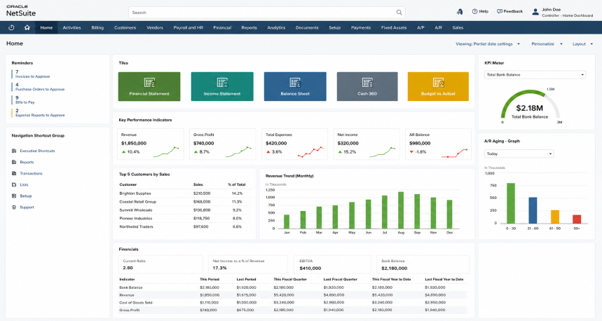
Example of a role-based NetSuite dashboard combining KPIs, reminders, financial summaries, and trend analysis in a single workspace.
The Visibility Challenge Many NetSuite Users Face
It is Monday morning. You log into NetSuite, open multiple tabs, run a few saved searches, export a report—and still feel like you are catching up instead of staying ahead.
Finance teams chase numbers. Operations teams manually track approvals. Managers rely on yesterday’s reports for today’s decisions.
The system is not the limitation.
The real gap is visibility—and that’s exactly where NetSuite dashboards make the difference.
Why NetSuite Dashboards Matter
At first glance, dashboards may seem like simple visual summaries. In reality, they are decision-enabling tools that bring clarity to daily operations.
A well-structured NetSuite dashboard helps you:
- Reduce time spent navigating across menus.
- Monitor real-time business performance.
- Identify bottlenecks before they escalate.
- Take action without switching screens.
Instead of searching for information, your dashboard delivers it instantly.
What Is a NetSuite Dashboard?
A NetSuite dashboard is a real-time, role-based workspace that brings together key metrics, reports, reminders, and actions in a single view. Dashboards help users monitor performance, identify issues, and take action without navigating multiple areas of the system.
How NetSuite Dashboards Are Structured
A NetSuite dashboard consists of:
- A dashboard layout (typically two or three columns)
- Portlets that display data, actions, or shortcuts
- Role permissions that control visibility
- Published dashboard settings.
- User personalization options
Because each portlet is configured independently, users can tailor dashboards to their specific needs while organizations maintain role-based standards.
What You Can Add to a NetSuite Dashboard
The flexibility of NetSuite dashboards allows you to design a workspace that truly reflects your role and priorities.
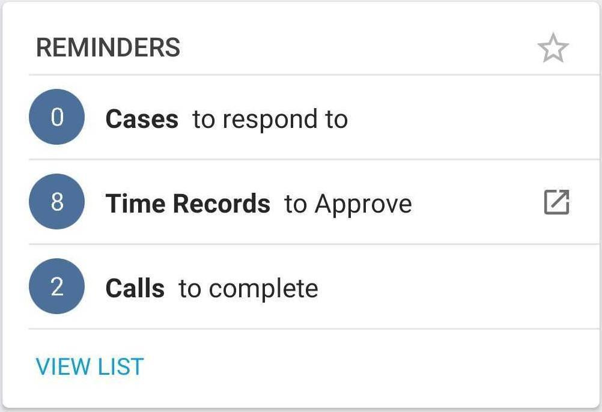
Reminder portlets help users track approvals, tasks, and other time-sensitive activities.
KPI Portlets
Track critical metrics such as revenue, expenses, and receivables. These provide instant visibility into business performance.
Saved Search Portlets
Display real-time filtered data directly on your dashboard—such as pending approvals or overdue transactions. This is one of the most powerful features for operational monitoring.
Reminders
Highlight actionable items like approvals, due payments, or tasks—ensuring nothing important is missed.
Report Snapshots
Offer summarized views of reports like Profit & Loss or Balance Sheet without needing to open full reports.
Trend Graphs
Visualize performance trends over time, helping identify patterns and anomalies quickly.
Shortcuts
Provide quick access to frequently used records and reports, reducing repetitive navigation.
Analytics Portlet
The Analytics Portlet allows users to surface SuiteAnalytics Workbook charts, pivots, and tables directly on dashboards, providing more advanced analytical capabilities than traditional KPI portlets.
NetSuite also provides additional components such as KPI Scorecards, KPI Meters, Calendars, Tasks, and Quick Search tools. While useful for specific roles, most organizations begin with KPIs, saved searches, reminders, trend graphs, and Analytics portlets.
Advanced Customization with Portlet Scripts
For organizations with more specialized dashboard requirements, SuiteScript Portlet Scripts provide an additional level of customization. Unlike standard dashboard portlets, they allow developers to build custom dashboard components that combine data from multiple NetSuite sources, present tailored visualizations, or surface information from external systems.
Portlet Scripts are commonly used for executive dashboards, operational control centers, integration monitoring, and other scenarios where standard dashboard components do not fully meet business requirements. Because they require SuiteScript development, they are typically used only when out-of-the-box dashboard capabilities are insufficient.
How Dashboards Improve Daily Workflows
Dashboards are not just about visibility—they fundamentally improve how work gets done.
For example:
- Finance teams can instantly track overdue receivables without running reports.
- Operations teams can monitor approvals in real time.
- Leadership gains immediate access to KPIs without waiting for updates.
The Foundation Behind Most Dashboards
Although dashboards appear visual, many of their most valuable components—such as reminders, custom KPIs, and operational monitoring views—are powered by saved searches.
The quality of the dashboard often depends on the quality of the saved searches behind it.
Visual Comparison: Without vs With Dashboard
| Without Dashboard | With Dashboard |
| Run multiple reports | See KPIs instantly |
| Search for transactions | View saved search results |
| Check approvals manually | Monitor reminders |
| Export data to analyze | Analyze directly in NetSuite |
Customizing NetSuite Dashboards
One of the strongest advantages of NetSuite dashboards is their adaptability.
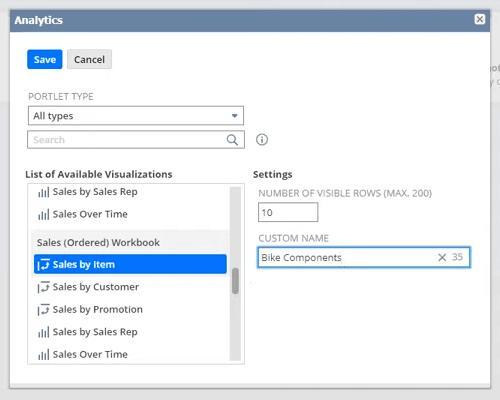
Analytics Portlets allow SuiteAnalytics Workbook visualizations to be displayed directly on a dashboard.
Personal Customization
Users can:
- Add or remove portlets.
- Rearrange layouts using drag-and-drop.
- Apply filters such as date range, subsidiary, or location.
- Customize saved searches.
This ensures each dashboard remains relevant to the user’s daily responsibilities.
Role-Based Standardization
Organizations can also create standardized dashboards for specific roles (e.g., finance, sales, operations), ensuring consistency while allowing flexibility.
Dashboard Governance
Organizations can publish dashboards to roles while allowing varying levels of personalization. The key decision is determining which dashboard elements should remain standardized and which users can customize.
Where Dashboards Are Available in NetSuite
Dashboards are not limited to just the home screen—they can be configured across multiple areas of the system.
You can personalize dashboards on:
- Home Dashboard
- Accounting Center
- Sales Center
- CRM Center
- Other role-specific centers
This enables context-driven insights, depending on where users operate within NetSuite.
Note: Availability of some dashboard components depends on enabled modules, features, and user permissions.
Avoiding the Most Common Dashboard Mistake
While dashboards are powerful, overloading them with too much information can reduce their effectiveness.
Clean vs Cluttered Dashboard
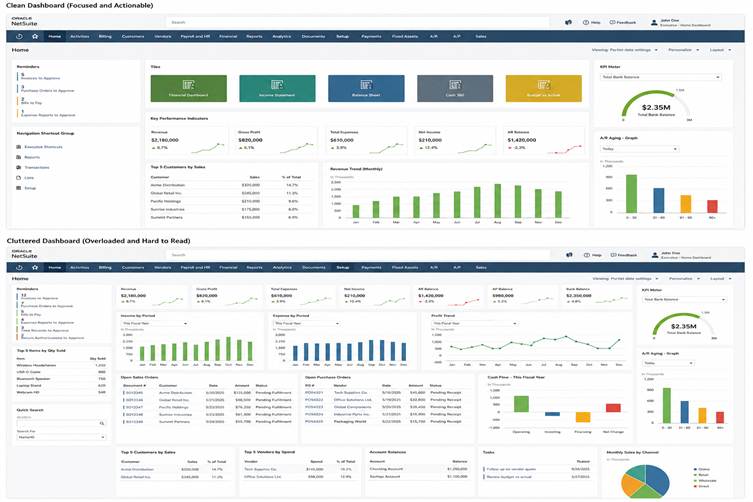
A focused dashboard highlights key metrics and actions without overwhelming users with excessive information.
A good dashboard should:
- Focus on key actions and insights.
- Avoid excessive portlets.
- Maintain clarity and readability.
Starting simple often leads to better long-term adoption.
Why Dashboards Are Critical for Growing Businesses
As organizations grow, information becomes harder to track across teams, processes, and locations. Dashboards help maintain visibility by bringing critical metrics, operational alerts, and performance trends into a single view, enabling faster and more consistent decision-making.
A Practical Way to Get Started
Rather than trying to build a perfect dashboard from day one, start with a small set of high-value components:
- A few key KPIs
- Critical reminders
- One or two saved searches that support daily decision-making.
Monitor how users interact with the dashboard and refine it over time. Starting simple improves adoption and helps ensure the dashboard remains focused on the information that matters most.
Final Thoughts
A NetSuite dashboard is more than just a visual interface—it is a strategic tool for better decision-making.
When used effectively, it:
- Reduces manual effort.
- Improves operational visibility.
- Enables faster, smarter decisions.
- Drives better system adoption.
For organizations aiming to unlock more value from NetSuite, dashboards are one of the most impactful places to begin.